Proposal · Infrastructure

Decentralized
Datacenter

Not one building — a self-healing datacenter spread across at least three separate offices. Post-quantum encrypted mesh, a hot database at every site, our own storage system, and no dedicated cooling at all.

3+
Sites / offices
204
CPU cores
1.55 kW
Total, at max load
0 W
Cooling
Prepared — November 2026 PoC hardware specification (PDF) ↓
01 — A New Way
01 / 12

A datacenter that isn't a building.

A traditional datacenter puts everything in one room — one power feed, one cooling system, one target. We turn that around: the system is spread across at least 3 separate locations (offices or stations). Each site holds a full bundle: 1 DB pod + 1 manager + 5 workers. The sites link over fiber and act as one datacenter. If a whole site is lost, the others keep serving.

DB pod Manager Worker 25GbE fiber · PQ-encrypted
02 — The Site Bundle
02 / 12

Every office is a complete datacenter.

  • The DB pod — the site's data layer. Hot database, ECC memory, RAID NVMe, and dual 25GbE fiber to the other sites.
  • The manager — the site's control plane. Scheduling, mesh, CDN edge and monitoring. 6 LAN ports: 1 uplink to the office network, 5 one-to-one to each worker.
  • The 5 workers — VMs, containers and static sites run here. Each one is also part of the storage layer on its own local NVMe.
  • Every node at a site connects automatically to every node at the other sites — no manual setup.
03 — Required Hardware
03 / 12

Three node types. All fit on a shelf, not a rack.
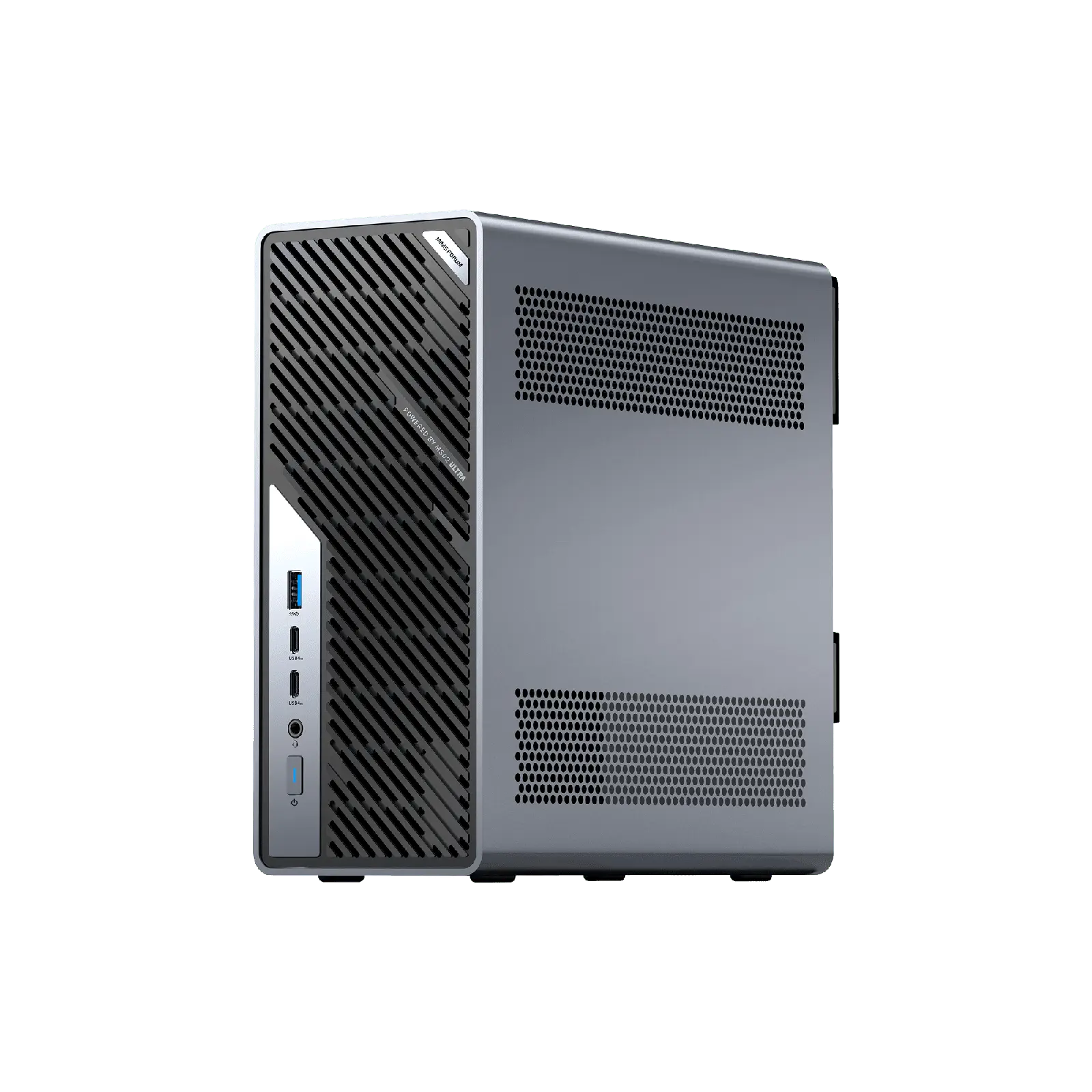
DB pod
DB Pod · ×1 per site

MINISFORUM MS-02 Ultra

CPUCore Ultra 9 285HX · 24C/24T
ECC memory256GB DDR5 ECC (4× 64GB)
Enterprise NVMe24TB · power-loss protected
Drive layout4 drives · RAID
Network2× 25GbE SFP28 · 10GbE · 2.5GbE
Max power350 W
Manager
Manager · ×1 per site

N150 Mini PC · 6× LAN

CPUIntel N150 · 4C/4T
Memory32GB
Storage1TB NVMe
Network6× 2.5GbE
Max power28 W
View listing →
Worker
Worker · ×5 per site

ACEMAGIC K1

CPURyzen 7 7730U · 8C/16T
Memory16GB
Storage1TB NVMe
Network2.5GbE
Max power28 W
View listing →
ItemPer site3 sitesNote
DB Pod (MS-02 Ultra)13256GB ECC RAM · 24TB enterprise NVMe
Manager (N150, 6× LAN)1332GB · 1TB
Worker (ACEMAGIC K1)51516GB · 1TB
25GbE SFP28 optic module26Inter-site fiber
Line-interactive UPS (1500VA)13Carries the whole bundle
Short Cat6 / DAC cables721No switch needed
Office network port26Provided by the site (manager + DB pod)
Total compute68C / 108T204C / 324T1,104GB RAM · 90TB NVMe

The 25GbE inter-site link needs dedicated fiber between sites (dark fiber or a carrier backbone).
04 — Power at Max
04 / 12

Worst case, every node at 100%: 518 W per site.

Every figure below is maximum power — all nodes at full load at the same time. Real day-to-day usage sits well below this.

DB Pod ×1350 W
Manager ×128 W
Workers ×5 (5 × 28 W)140 W
Site total518 W
Cooling0 W
0 W
All 3 sites · max load
518 Wper site
7.6 Wper core
Why No Cooling Is Needed

Every watt a computer uses turns into heat. A traditional datacenter packs thousands of watts into one room, so it has to spend extra energy pushing that heat out. In our system the heat is split across sites: one office produces at most 518 W — less than a quarter of a typical 2 kW electric heater. Normal office ventilation handles it on its own. No dedicated cooling, no cold aisle, no cooling bill.

05 — Same Cores, Two Ways
05 / 12

The same 204 CPU cores. A quarter of the power.

Traditional

HPE DL380 Gen10 · 204 cores

2× Xeon Gold 6230 (40 cores per server) · scaled to exactly 204 cores (5.1 servers) · 800 W max per server · facility PUE 1.6

Our Platform

3 sites × 7 nodes · 204 cores

3 DB pods + 3 managers + 15 workers · every node at max power · PUE ~1.0 (no cooling)

Total facility power (max, incl. cooling)−76.2%
Traditional
6,528 W
Our platform
1,554 W
Cooling & facility overhead−100%
Traditional
2,448 W
Our platform
0 W
Watts per CPU core−76%
Traditional
32.0 W
Our platform
7.6 W
Annual electricity (24/7 at max, $0.105/kWh)−76.2%
Traditional
$6,004
Our platform
$1,429
Single point of failureEliminated
Traditional
1 room
Our platform
None

Both sides have exactly 204 CPU cores. The traditional side is scaled from 40-core DL380 Gen10 servers (800 W max each), plus cooling at PUE 1.6. Annual cost assumes 24/7 at max load and $0.105/kWh.

06 — Features
06 / 12

Everything a datacenter needs, built in.

07 — Mesh Networking
07 / 12

Traffic recorded today can't be decrypted tomorrow.

Encrypted traffic can be recorded today and decrypted later by a quantum computer. So the mesh runs on our own modified WireGuard: every handshake combines X25519 with NIST's post-quantum ML-KEM-768.

  • The full mesh — every node has a direct encrypted tunnel to every other node.
  • The zero-trust model — no public IPs; nothing without a key gets in.
  • The key rotation — new session keys every 2 minutes; keys older than 3 minutes are refused.
  • The auto setup — new nodes create their own keys and routes.
08 — Hot Database
08 / 12

A database next to every node. A copy at every site.

Each site carries its own DB pod, so nodes read from their own site over a fast local link — queries never travel between cities. Writes are copied to the other sites over dual 25GbE fiber, and are only accepted once a majority of sites confirm.

Local read / write 25GbE replication Majority commit
  • The CockroachDB engine — distributed SQL for anything that needs consistency. Raft consensus; no data loss if a site goes down.
  • The MongoDB engine — JSON documents for data whose shape keeps changing: sensors, logs, telemetry.
  • The Redis layer — absorbs the busiest reads at RAM speed, before they ever hit disk.
  • The dual 25GbE SFP28 link — inter-site replication never shares bandwidth with general traffic.
  • The 256GB ECC DDR5 — the working set stays in RAM; ECC fixes silent bit flips before they reach a commit.
  • The local RAID on power-loss-protected enterprise NVMe — a failed drive is absorbed on the node, without a cluster-wide rebuild.
09 — Automated CDN & SSL
09 / 12

Point a domain at it. The rest is automatic.

Every site is also a CDN edge. A user's request goes to the nearest site and is served from cache there. The moment an HTTP service goes live, the system fetches and renews its certificate by itself.

  • The auto SSL — ACME certificate issuance, renewal before expiry, HTTP→HTTPS redirect.
  • The auto CDN — static files are cached at every site; no third-party CDN provider.
  • The health-checked routing — if a site stops answering, requests go to the other sites.
  • The traffic stays on your infrastructure — certs, logs and cache never leave it.
User request Fetch from origin (MISS) Served from cache (HIT)
10 — Panel & Monitoring
10 / 12

VMs, containers, static sites — one panel.

KVM virtual machines, Docker Swarm containers and static websites are all created from the same panel. The system picks which node runs them, and moves them if a node is lost.

panel · cluster-tr

21 / 21
Nodes online
—
Avg CPU
—
Power now
99.99%
Uptime target
11 — Storage System (New)
11 / 12

zonefs — designed from scratch for this system.

Open-source distributed storage usually won't acknowledge a write until it has made a round trip across the network — so a VM disk runs far below the NVMe underneath it. We wrote zonefs in Rust to fix exactly that: writes land at local NVMe speed, and copies spread automatically to nodes in other zones.

  • The symmetric nodes — CockroachDB-style: no master, no special node to lose.
  • The zone awareness — each site is a zone; copies are always placed in different zones.
  • The mounted directory on every node — VMs and containers use it like a normal disk.
  • The automatic sync — a new or returning node fills in its missing copies by itself.
  • The mount-only mode — managers can mount storage without holding data locally.
5.8×
faster sequential write than the next best (GlusterFS)
4.9×
more random-write IOPS than the next best (GlusterFS)
1.9×
more random-read IOPS than the next best (GlusterFS)
6.0×
faster VM disk than AWS Lightsail / EBS

zonefs vs GlusterFS vs SeaweedFS vs Ceph

zonefs GlusterFS SeaweedFS Ceph

Measured on the same N150 node with the same script, 9 Nov 2026. zonefs, GlusterFS and SeaweedFS are from the same run; Ceph is from the earlier run the same day (ceph-fuse v19).

VM disk vs AWS

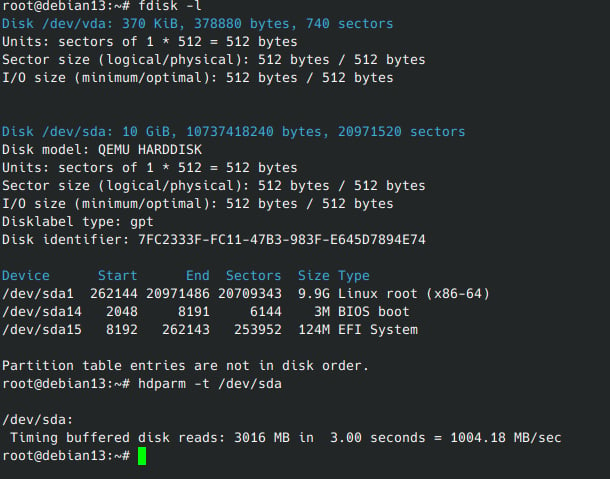
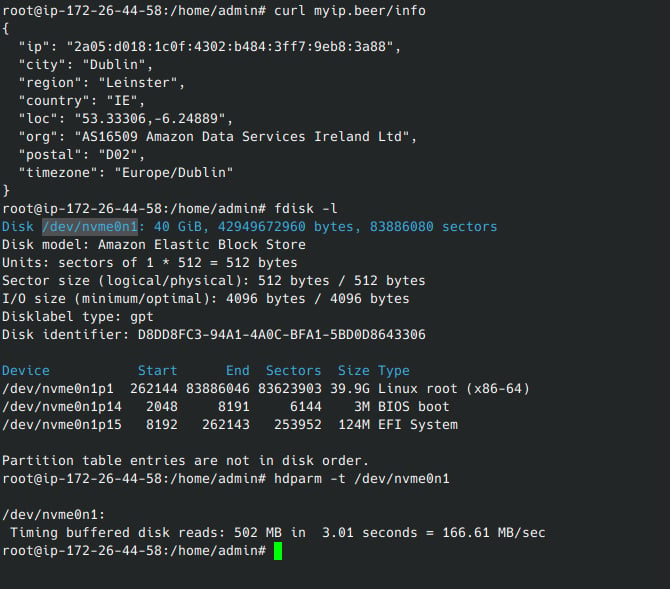
6× the disk speed AWS Lightsail gives a VM.

Same command on both machines: hdparm -t. Lightsail runs on AWS's Elastic Block Store (EBS) network disk; our VM runs right next to the node's NVMe.

Our platform VM (Debian 13)0 MB/s
AWS Lightsail / EBS (Dublin)0 MB/s

hdparm -t · buffered disk reads · 3 seconds

hdparm on our platform VM
Our platform VM — 1004 MB/s
hdparm on AWS Lightsail
AWS Lightsail / EBS — 166 MB/s
12 — Uptime & High Availability
12 / 12

A node fails. A site is hit. Service continues.

Every layer of the system is designed for high availability. When a node fails, the system detects it and moves its services to another machine automatically. Because storage is distributed, every piece of data has copies at other sites — so even if a drone or missile strike destroys a whole site, the remaining sites keep running, with the data.

Status
—
Services
9 / 9
DB quorum
3 / 3
Data loss
0 B
  • The node failure case — heartbeats stop, and its services restart on another node at the same site within seconds.
  • The site loss case — if a whole site goes, requests route to the other sites and services reopen there.
  • The zero data loss rule — database writes aren't accepted until a majority of sites confirm; a committed transaction can't be lost with a single site.
  • The automatic recovery — when a site comes back, it syncs its missing data and takes load again by itself.
  • The scalable resilience — 3 sites survive the loss of any one site; 5 sites survive losing two at once.
  • The geographic spread — we recommend placing sites in different cities or regions.
Thank You

Thank you for your time.